
demo-bracket.3mf70%
220°/ 220°60°/ 60°
AMS·34°·32%
A1 PLA
27%270 g
▶
A2 PLA
75%750 g
A3 PLA
62%620 g
A4 PLA
90%900 g
Gantry
Gantry shows print progress, temperatures, filament and camera feeds for every printer you own. It runs on macOS, Windows and Linux.

01Overview
Whether you have one printer or five, you instantly see what they're printing, how long is left and how much filament is in the AMS.
 · 6 printers · 5 printing
AMS·34°·32%
A1 PLA
27%270 g
A2 PLA
75%750 g
A3 PLA
62%620 g
A4 PLA
90%900 g
AMS·34°·32%
A1 PLA
27%270 g
A2 PLA
75%750 g
A3 PLA
62%620 g
A4 PLA
90%900 g
AMS·34°·32%
A1 PLA
27%270 g
A2 PLA
75%750 g
A3 PLA
62%620 g
A4 PLA
90%900 g
AMS·34°·32%
A1 PLA
27%270 g
A2 PLA
75%750 g
A3 PLA
62%620 g
A4 PLA
90%900 g
AMS·34°·32%
A1 PLA
27%270 g
A2 PLA
75%750 g
A3 PLA
62%620 g
A4 PLA
90%900 g
AMS·34°·32%
A1 PLA
27%270 g
A2 PLA
75%750 g
A3 PLA
62%620 g
A4 PLA
90%900 g
Print in peace — everything under control
02An evening in the workshop
Five printers and several prints at once. On the left you check everything yourself; on the right Gantry tells you.
Sample scenario
03Views
Peek from the menu bar, open a separate window or keep the cameras at the edge of your screen.
· 6 printers · 5 printingAMS·34°·32%
A1 PLA
27%270 g
A2 PLA
75%750 g
A3 PLA
62%620 g
A4 PLA
90%900 g
AMS·34°·32%
A1 PLA
27%270 g
A2 PLA
75%750 g
A3 PLA
62%620 g
A4 PLA
90%900 g
Print in peace — everything under control
Open it for a moment, click away and get back to work.
· 2 printers · 2 printingAMS·34°·32%
A1 PLA
27%270 g
A2 PLA
75%750 g
A3 PLA
62%620 g
A4 PLA
90%900 g
AMS·34°·32%
A1 PLA
27%270 g
A2 PLA
75%750 g
A3 PLA
62%620 g
A4 PLA
90%900 g
Print in peace — everything under control
A separate window you size to your screen and number of printers.
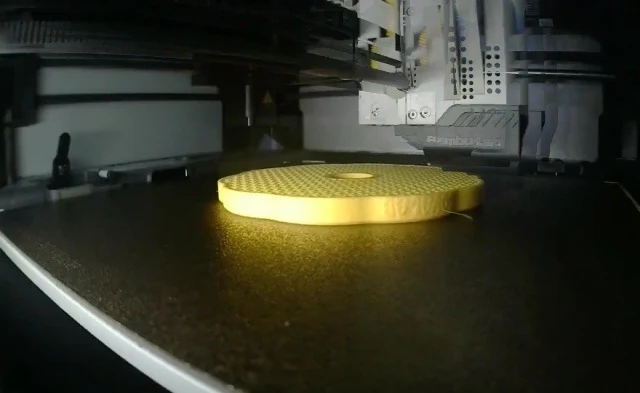 LIVE
LIVE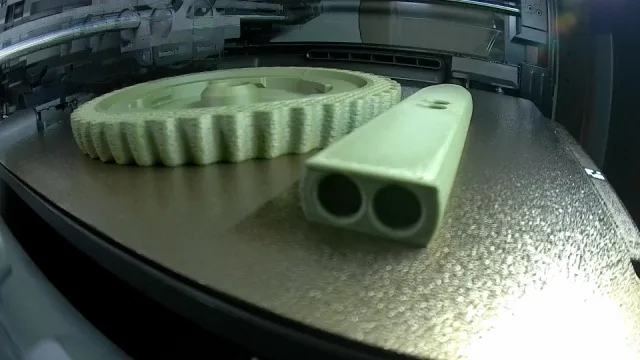 LIVE
LIVECameras and progress at the edge of the screen, next to your project in the slicer.
Open it for a moment, click away and get back to work. The current print's percentage stays in the menu bar the whole time.
A separate window you size to your screen and number of printers. All cards at once, with temperatures and AMS.
Cameras and progress at the edge of the screen, next to your project in the slicer. Pin it and it stays expanded.
· 6 printers · 5 printingAMS·34°·32%
A1 PLA
27%270 g
A2 PLA
75%750 g
A3 PLA
62%620 g
A4 PLA
90%900 g
AMS·34°·32%
A1 PLA
27%270 g
A2 PLA
75%750 g
A3 PLA
62%620 g
A4 PLA
90%900 g
AMS·34°·32%
A1 PLA
27%270 g
A2 PLA
75%750 g
A3 PLA
62%620 g
A4 PLA
90%900 g
AMS·34°·32%
A1 PLA
27%270 g
A2 PLA
75%750 g
A3 PLA
62%620 g
A4 PLA
90%900 g
Print in peace — everything under control
· 4 printers · 4 printingAMS·34°·32%
A1 PLA
27%270 g
A2 PLA
75%750 g
A3 PLA
62%620 g
A4 PLA
90%900 g
AMS·34°·32%
A1 PLA
27%270 g
A2 PLA
75%750 g
A3 PLA
62%620 g
A4 PLA
90%900 g
AMS·34°·32%
A1 PLA
27%270 g
A2 PLA
75%750 g
A3 PLA
62%620 g
A4 PLA
90%900 g
AMS·34°·32%
A1 PLA
27%270 g
A2 PLA
75%750 g
A3 PLA
62%620 g
A4 PLA
90%900 g
Print in peace — everything under control
LIVELIVE04Try it
Click a printer, look into the AMS, then click outside the panel. It's a simulation in your browser — it doesn't connect to any printer.
A MacBook screen opens with the desktop, the menu bar and a working Gantry panel.
Or watch a 35-second film: five real views of the app.
05Features
Printer details
Print stage, recent jobs, statistics, camera and the full AMS layout — in the order you choose.
TEMPERATURES
NOZZLE220° / 220°
BED60° / 60°
CHAMBER34°
FILAMENTS / AMS
AMS·34°·32%
A1 PLA
27%270 g
A2 PLA
75%750 g
A3 PLA
62%620 g
A4 PLA
90%900 g
Filament
Material, colour, level and humidity. A spool running low gets a red dot.
A4 · ABS: filament running low
Spoolbase
Spools, colours and materials in one inventory. Usage updates after each print.
No matching filaments.
See how stock changes after a print.
Maintenance
Rails, axes, belts and nozzle — reminders based on print hours.
Statistics
Run time, completed prints and success rate. Export to a file.
Print control
Skip a selected object on supported Bambu Lab and Klipper printers. Turn on control in settings.
Pick the failed object on the plate. Gantry keeps printing the other objects.
06For bigger workshops
As your printer count grows, tools for the whole fleet come in handy. You turn most of them on separately, when you need them.
Farm
A file library by printer family, AMS material matching and “Check selection” before starting. The queue starts the next copy only after you confirm an empty bed.
DocumentationMaintenance & service
An “In service” status, tasks with checklists by print hours or days, problems with a photo and priority, and a parts inventory with minimum stock.
DocumentationWeb dashboard
On your local network there’s a read-only preview. On your own PHP and HTTPS hosting, Gantry prepares a site package that also works outside your Wi-Fi.
DocumentationLITE mode
When you only need progress in the menu bar or tray, LITE hides the other tools. Your printers, history and stock stay saved.
Documentation07Colours and filaments
The Farm matches the filaments in a sliced file to what is actually loaded — by material and colour. No moving spools around, no slicing the file again.
Bambu Lab · AMS
Gantry works out which AMS slot prints which colour and sends that with the start command.
G-code · multi-tool
On multi-tool G-code printers Gantry changes T0, T1, T2… in a working copy of the file, so each colour lands on the right toolhead.
When a colour has nowhere to go, Gantry doesn’t guess — the pre-send check shows what’s missing.
Multi-material systems in Gantry
Slots, colours, the active source and amounts — as much as the printer reports.
08Gantry Vision
While you print, it watches the camera feed and flags a suspected problem, such as “spaghetti” or a detached model. The analysis runs on your computer.
X1 · watching
ok94%
spaghetti4%
detached2%
It needs a camera and good lighting — a dark or blocked image can't be judged reliably. Turn it on in Settings → Advanced. You can also choose your own ONNX model. How to turn on Gantry Vision
09Costs
Gantry counts filament and electricity, and with a Tasmota or Shelly plug it measures power draw while you print. See how it adds up in an example.
Gantry · Print report

File / job: adapter.3mf
Printer: X1
Result: Completed
Print duration: 4h 30m

ENERGY
0.6750 kWh · estimated from printer wattage
Electricity cost: 0.68 PLN

FILAMENT
1. PLA · 120.00 g · 80.00 PLN/kg

COSTS
Filament: 9.60 PLN
Electricity: 0.68 PLN
Machine time: 0.00 PLN
Print cost: 10.28 PLN
Estimated sale price: 14.47 PLN
Estimated profit: 3.24 PLN
10Telegram
Alerts reach your phone, and your bot replies with status, buttons and a camera snapshot.
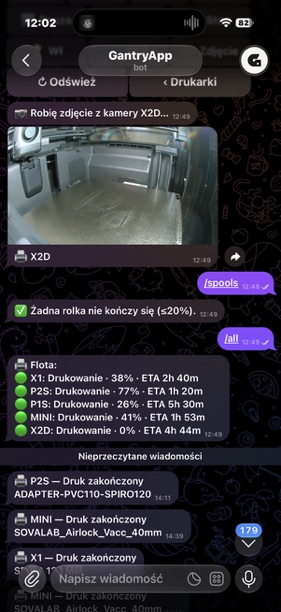
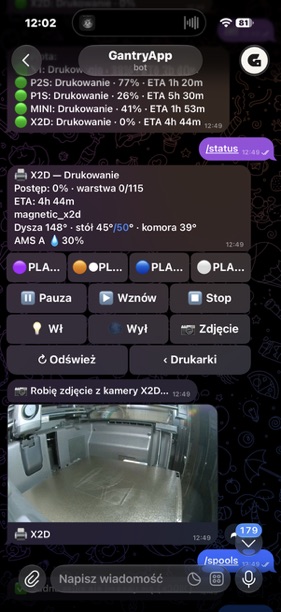
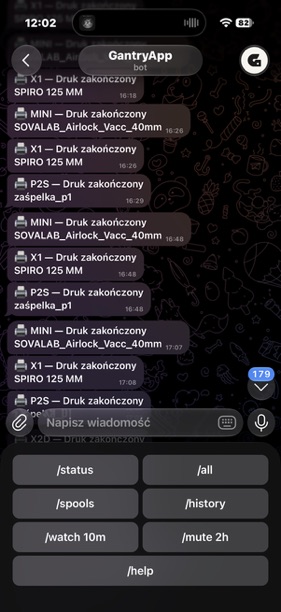
Your own bot, your chat. The bridge is a computer running Gantry.
11Web dashboard
Gantry shows your fleet in a browser too: on your home network, or through a bridge to your own hosting, away from Wi-Fi as well. No separate app and no Gantry server in between.
12Compatibility
Five features across six FDM printer families, plus a status view for selected resin printers. Some features must first be turned on in the printer, e.g. LAN-only on Bambu Lab. Code as of 21 October 2026.
Pick a row to see the printer’s details.
availabledepends on the model, firmware or setupnot available
MQTT · LAN mode
MQTT in LAN mode. Control once LAN-only and Developer Mode are on.
Moonraker
Moonraker, also Creality, Qidi and Snapmaker U1. G-code files.
Centauri Carbon 1 and 2
Centauri Carbon 1 and 2. MJPEG camera, pause and stop.
Kobra S1
Kobra S1 with ACE Pro. FLV camera, pause, resume and stop.
PrusaLink
PrusaLink. Pause, stop and G-code files; camera as a separate address.
Local API
2.0 and Artisan, local API. Camera as a separate address.
SLA / MSLA · experimental
SLA / MSLA: Elegoo, Anycubic Photon, Prusa SL1, Formlabs. Status only, experimental.
YesConditionalNoFull model list
13Privacy
Core monitoring runs directly between your computer and your printers. No Gantry account and no relay server.
Gantry connects to devices on your LAN. You don't need the cloud for everyday monitoring.
Access codes live in the macOS Keychain, Windows DPAPI or Linux Secret Service.
MIT licence. The code is there to read, build and extend.
The same Gantry on macOS, Windows and Linux. Your computer and printers need to be on the same local network, and you add each printer with the “+” button.
v0.14.0 · · MIT · What's new
Apple Silicon and Intel
Gantry-0.14.0-macOS.dmgdrag to Applications · 28 MB
Gantry-0.14.0-macOS-Local.zipcomplete app in a ZIP · 27 MB
The app is not notarised by Apple. If macOS blocks it, choose System Settings → Privacy & Security → Open Anyway.
Download for macOSWindows 10 or 11, 64-bit
Gantry-Setup-Windows-x64.exePL/EN installer, recommended · 76 MB
Gantry-Windows-x64.zipportable version · 100 MB
The .NET runtime is included, no separate install needed. Your data stays after uninstalling.
Download for Windowsx86_64 · glibc 2.39+, e.g. Ubuntu 24.04
Gantry-0.14.0-Linux-x86_64.AppImageno install needed · 176 MB
.debDebian, Ubuntu · 156 MB
.rpmFedora · 180 MB
The packages are not for ARM or Raspberry Pi. The tray icon may need AppIndicator support.
Download for Linux14FAQ
It's a monitor for your 3D printing workshop. It shows printer status, progress, temperatures, filaments and available camera feeds. You still prepare models in your slicer.
Core monitoring needs no Gantry account and no relay server. Printers connect to the app over your local network. Telegram is optional.
Bambu Lab, Klipper / Moonraker, PrusaLink and selected Elegoo, Anycubic and Snapmaker models. Resin printers get an experimental status view too: Elegoo Saturn and Mars, Anycubic Photon, Prusa SL1 and Formlabs. The full model list is in the documentation on GitHub.
In the window and bar settings, turn on the edge panel, choose the display and side of the screen, then pin it. Camera availability depends on the printer.
No. The bridge between your printers and Telegram is a computer running Gantry with a network connection.